
TD999 Game

Description
The mobile gaming industry continues to expand as more users search for lightweight applications that are simple to install and easy to use. Among the names attracting attention, TD999 Game has become a popular search because it offers a clean interface, smooth performance, and multiple gaming options within a single application. Whether someone is exploring the platform for the first time or looking for updated information, understanding how the app works before installing it is always a smart decision.
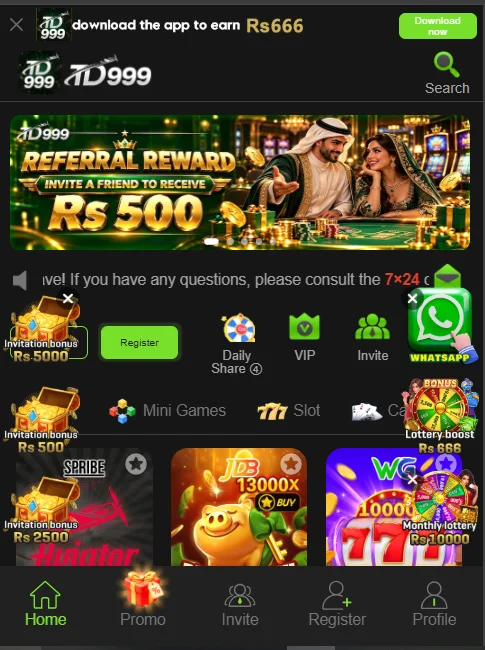
TD999 APP is designed with Android users in mind, offering quick navigation, responsive controls, and an organized dashboard. The application aims to provide a comfortable experience across different smartphone models without requiring high-end hardware. Regular updates help improve stability and introduce new improvements, making the app easier to use over time.
This guide explains everything a beginner should know, including its main features, installation process, account creation, device compatibility, security tips, and practical advice for getting started.
What Is TD999 Game APK 2027?
Based on what we saw during testing, TD999 is an Android application built around a game lobby, along with deposit and withdrawal features tied to a user account. Users register with a mobile number, verify via OTP, and can move funds in and out of the app.
We could not independently verify who develops or operates, or what company is legally responsible for the app. This information wasn’t available to us during testing, and we’re not going to guess at it.
Important note before you install: Because it involves depositing and withdrawing real money, treat it the same way you’d treat any financial app such as HH98. We did not verify licensing status or legal standing for operating in Pakistan. If you’re unsure whether an app like this is permitted where you live, that’s worth checking before you fund an account not after.
Key Features of TD999 Game in Pakistan
Simple Dashboard Design
The home screen is designed to help users locate important sections quickly. Games, account settings, notifications, and support options may be available through an organized navigation menu.
Smooth Android Performance
A mobile-focused design can provide responsive navigation and convenient access to different application sections. Performance may vary depending on the Android device and internet connection.
Lightweight Installation Package
The APK may be designed for convenient installation on Android smartphones. Users should check the actual file size and storage requirements before downloading.
Easy Navigation
Clear menus and organized categories can help users move between different sections without confusion. Beginners can explore the dashboard and understand its basic functions more easily.
Regular Updates
Application updates may introduce performance improvements, fix technical issues, and improve security. Users should always check the source and version before installing an update.
Multiple Activity Categories
TD999 Game Login descriptions mention different entertainment categories, including card games, slots, table-style games, and mini-games. Actual availability may change between versions.
User Account Management
The profile section may provide access to account information, login settings, security options, and other important tools.
Responsive Interface
Buttons, menus, and application pages are designed to support mobile navigation, helping users move between sections conveniently.
How to Download TD999 Game APP
Before downloading the application, make sure you are using a reliable source. Check the available version, developer information, and Android compatibility.
Android Download Steps
- Visit the provider’s official or verified website.
- Find the TD999 APP download section.
- Check the available APK version.
- Review the developer and application information.
- Tap the Download APK option.
- Wait for the download to finish.
- Open your Downloads folder.
- Confirm that the APK file downloaded correctly.
Avoid modified APK files and suspicious download links. A website’s claim that a file is official does not independently confirm its authenticity.
How to Install TD999 Game Download
After downloading the APK from a source you trust, follow these general instructions.
Installation Guide
- Open the file manager on your Android phone.
- Locate the downloaded APK file.
- Tap the file to begin installation.
- Review any Android security warning.
- Allow installation from that source only if you have verified it.
- Follow the instructions displayed on your phone.
- Wait for the installation to finish.
- Open TD999 Download from your home screen.
Check the permissions requested by the application and avoid granting unnecessary access to personal information.
Creating Your TD999 Game Account
Creating an account depends on the registration system provided by the actual service. If a genuine registration option is available, follow these general steps.
Registration Steps
- Launch the verified application.
- Select Create Account or Register.
- Enter your mobile number or other requested details.
- Choose a strong and unique password.
- Complete verification if required.
- Review the account information.
- Read and accept the applicable terms.
- Submit the registration form.
Never share your password, OTP, or account PIN with another person.
How to Log In to TD999 Game
Existing users can follow these instructions if the application provides a login feature.
- Open the TD999 APK application.
- Select the Login option.
- Enter your registered mobile number or username.
- Type your account password.
- Complete security verification if requested.
- Review your information.
- Submit the login form.
- Use the official recovery option if you cannot access your account.
For better security, avoid logging in through suspicious links or on untrusted devices.
Exploring the Main Dashboard
After logging in, users may find different sections arranged through the main dashboard.
Common options may include:
- Home
- Game Categories
- Account Profile
- Wallet
- Promotions
- Daily Activities
- Notifications
- Security Settings
- Customer Support
The actual dashboard layout and available features should be checked in the current application.
Managing Your Account
The account section may allow users to review personal information and access important settings.
Common account management options may include:
- Personal profile
- Password settings
- Security options
- Notification preferences
- Account activity
- Promotional records
- Wallet information
Review these sections regularly and keep your account information secure.
Adding Funds to Your Wallet
Some online descriptions mention wallet-related features, but the current payment services for TD999 Game have not been independently confirmed.
If a genuine deposit option is available, check the payment details before sending money.
Deposit Guide
- Log in to your account.
- Open the Wallet section.
- Select Deposit.
- Review the available payment methods.
- Check the minimum and maximum limits.
- Enter the required amount.
- Review the payment information.
- Confirm only if you trust the payment process.
Never send money to an unknown person claiming to be an official platform agent.
Submitting a Withdrawal Request
If withdrawal services are supported, users should first review the platform’s current requirements.
Withdrawal Guide
- Open your account.
- Navigate to the Wallet section.
- Select Withdraw.
- Check the supported withdrawal methods.
- Enter the required payment information.
- Specify the requested amount.
- Review all details carefully.
- Submit the request if the service is verified.
- Keep your transaction reference.
Processing times and withdrawal conditions may vary. Do not make additional payments simply because an earlier request is delayed.
Compatible Android Devices
TD999 Game Online is described as an Android-focused application. Compatibility depends on the actual APK requirements and your phone’s specifications.
Before installation, consider the following:
- Entry-level Android smartphones.
- Mid-range Android devices.
- Available storage space.
- Android operating system version.
- Stable internet connection.
- Application permission requirements.
Check the provider’s compatibility information rather than assuming that every Android phone is supported.
Helpful Security Tips
Protecting your account and device is important when using an unfamiliar application.
Recommended Practices
- Use a strong and unique password.
- Never share OTP or verification codes.
- Download APK files only from verified sources.
- Keep your application updated.
- Log out from shared devices.
- Review account activity regularly.
- Avoid unofficial modified APKs.
- Check application permissions.
- Read privacy and payment policies carefully.
- Keep your Android operating system updated.
You can also review Google’s official information about Google Play Protect to understand Android application security.
Tips for New TD999 Users
If you are exploring the application for the first time, these suggestions may help:
- Spend time exploring the main dashboard.
- Read instructions before trying a new game.
- Check the available application version.
- Use a stable internet connection.
- Keep your account information private.
- Review platform announcements.
- Understand how different sections work.
- Check promotional terms before accepting offers.
- Set a spending limit if real-money features are available.
- Remember that gaming does not guarantee income.
My Personal Review
TD999 Game Download APK is presented online as a mobile gaming platform with different entertainment categories and account management features. Its descriptions mention card games, slots, table-style activities, and mini-games.
The organized interface and mobile-focused design may appeal to users who prefer simple navigation. However, the actual application performance, APK size, available games, and payment services need to be checked through reliable provider information.
Before installing the application, users should verify its source, review its permissions, and understand its terms. Real-money gaming can involve financial losses, so it should never be treated as a guaranteed earning opportunity.
Final Verdict
TD999 Game Casino offers a mobile-focused gaming concept with an organized dashboard, possible multiple activity categories, and account management features. Its simple navigation may make it easier for Android users to explore the application.
If you are considering installing it, first verify the APK source, developer information, Android compatibility, and current application features. Keep your account secure, review all payment conditions, and use the platform responsibly.
Frequently Asked Questions
Is TD999.com available for Android?
Online descriptions provide Android APK information. Check the actual download source and device requirements before installation.
Is TD999 Online easy for beginners?
Its described interface focuses on simple navigation and organized menus, which may help beginners understand the main sections.
Why should I install the latest version?
Newer versions may include bug fixes, performance improvements, and security updates. Always verify the source before updating.
Can I use TD999 Casino on older Android phones?
Compatibility depends on the APK requirements, Android version, and device specifications.
Does TD999 Bet provide account management?
Descriptions mention account-related features such as profile settings and login options. Check the current application to confirm availability.
Are payment options available?
Wallet and payment features have been mentioned in online descriptions, but their current availability and supported methods have not been independently confirmed.
Is TD999 Game safe to download?
Its safety cannot be confirmed without reliable information about the developer, APK file, permissions, and privacy practices. Verify these details before installation.
Download links
How to install TD999 Game APK?
1. Tap the downloaded TD999 Game APK file.
2. Touch install.
3. Follow the steps on the screen.